Lenovo ThinkStation P4: Powerful AI & Professional Workstation | Intechs Computers Kenya

Updated: Sep 25
Intechs Computers | Nairobi, Kenya
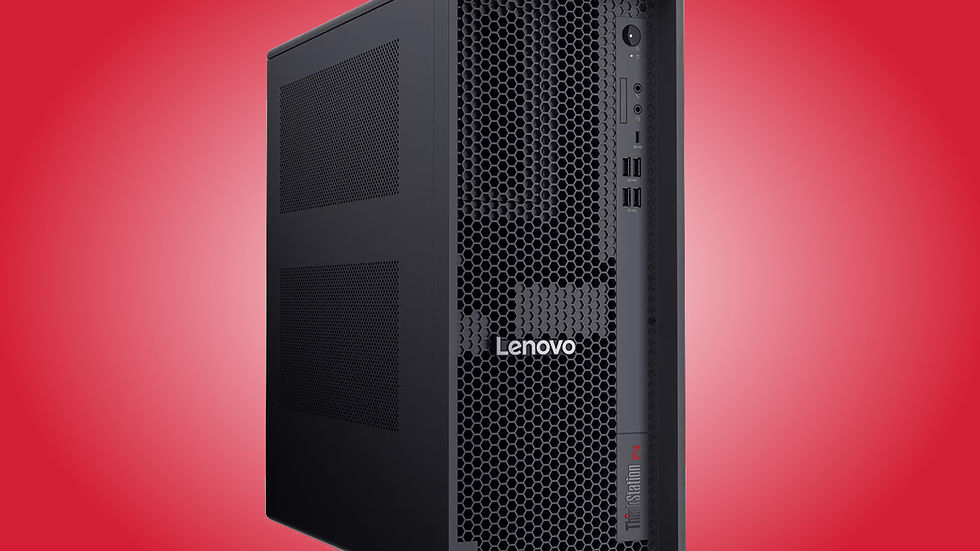
Lenovo has introduced the ThinkStation P4, a new professional desktop workstation designed for demanding workloads. This includes artificial intelligence, engineering, 3D design, CAD, simulation, rendering, content creation, and software development.
The ThinkStation P4 combines AMD Ryzen PRO processors with professional NVIDIA graphics, high-capacity DDR5 memory, fast NVMe storage, and workstation-class expansion. Lenovo positions this platform for professionals who need sustained performance and the ability to configure their systems around increasingly demanding workloads. (Lenovo StoryHub)
A Workstation Built for Demanding Professional Work
Unlike a typical office desktop, the ThinkStation P4 is designed for workloads that can keep the processor and graphics hardware busy for extended periods.
Who Can Benefit?
Potential users include:
Architects
Engineers
CAD professionals
3D artists
Video editors
AI developers
Data scientists
Software developers
Product designers
Researchers
Simulation professionals
Professional content creators
Lenovo states that the platform is designed for workloads including CAD, BIM, solid modelling, simulation, rendering, compositing, animation, and software development. (Lenovo StoryHub)
AMD Ryzen PRO 9000 Series Performance
The ThinkStation P4 can be configured with high-performance AMD Ryzen PRO 9000 Series processors. The top configuration listed by Lenovo is the AMD Ryzen 9 PRO 9965X3D, which features up to 16 cores and speeds of up to 5.5GHz. The platform also supports other Ryzen PRO processors, allowing organizations to select performance according to their workloads and budget. (Lenovo)
This flexibility is crucial for businesses. Not every workstation user needs the same level of processing power. An engineer working on complex simulations may require a very different configuration from an accountant, software developer, or content creator.
Up to 256GB of DDR5 RAM
Memory is another major strength of the ThinkStation P4. The workstation supports up to 256GB of DDR5 memory, with supported memory speeds reaching up to 6400MT/s depending on configuration. (Lenovo)
Large memory capacity can be particularly useful when working with:
Large engineering models
Virtual machines
Complex datasets
Professional video projects
3D scenes
AI development
Scientific applications
Large software development environments
For many professional users, having enough RAM can be just as important as having a powerful processor.
Professional NVIDIA RTX Graphics
Graphics performance is one of the most important differences between a workstation and a conventional business desktop. The ThinkStation P4 supports professional NVIDIA RTX graphics configurations, including the NVIDIA RTX PRO 6000 Blackwell Workstation Edition in Lenovo's official specifications. Lenovo lists the RTX PRO 6000 Blackwell with up to 96GB of GDDR7 ECC VRAM. (Lenovo StoryHub)
Professional RTX graphics can be particularly valuable for:
3D modelling
CAD
Rendering
AI workloads
Visualization
Video production
Simulation
Engineering applications
Professional graphics
The large amount of VRAM is especially relevant to workloads involving large 3D scenes, AI models, and complex professional datasets.
AI-Ready Workstation
Artificial intelligence is becoming increasingly important across engineering, design, media, software development, and business. The ThinkStation P4 is designed with accelerated AI workloads in mind. Lenovo lists GPU AI performance of up to 4000 TOPS, depending on configuration. (Lenovo StoryHub)
This makes the workstation suitable for professionals exploring:
Local AI development
AI model inference
Generative AI workflows
Computer vision
Data analysis
AI-assisted design
Machine-learning development
The advantage of workstation-based AI computing is that organizations can perform certain workloads locally instead of relying entirely on cloud infrastructure.
Massive Storage Expansion
The ThinkStation P4 is also designed for users who need substantial local storage. Lenovo's specifications show support for up to six total drives, including up to three M.2 NVMe SSDs and three 3.5-inch SATA drives. Maximum supported capacity is listed at up to 12TB of M.2 storage plus 36TB of 3.5-inch storage, depending on configuration. (Lenovo)
That provides plenty of room for:
4K/8K video projects
CAD libraries
Engineering datasets
Virtual machines
Databases
AI datasets
Project archives
Large media collections
Storage can also be configured to suit performance or redundancy requirements, with Lenovo listing RAID 0/1/5 support. (Lenovo)
Advanced Cooling for Sustained Performance
High-performance components generate significant heat, particularly when running demanding workloads for hours. Lenovo has designed the ThinkStation P4 with an advanced thermal system, including optional liquid cooling for higher-power CPU configurations. (Lenovo)
This is particularly relevant for professionals who routinely perform long rendering, simulation, compilation, or data-processing tasks.
High-Power 1,100W PSU Option
The workstation can be configured with 500W, 750W, or 1,100W power supplies, depending on the hardware installed. (Lenovo)
The higher-power configuration allows the workstation to support demanding processor and professional GPU combinations.
Modern Connectivity
The ThinkStation P4 also includes modern connectivity options. Depending on configuration, users can get:
USB-C
Multiple USB-A ports
DisplayPort
HDMI
2.5Gb Ethernet
Wi-Fi 7
Bluetooth
PCIe expansion
Lenovo also provides PCIe Gen 5 support and multiple expansion slots, giving organizations room to upgrade the workstation as requirements change. (Lenovo)
Designed for Future Upgrades
One of the biggest advantages of choosing a workstation is expandability. Instead of replacing the entire computer when requirements increase, organizations can potentially upgrade components such as:
RAM
Storage
Graphics
Expansion cards
Networking
The ThinkStation P4's PCIe Gen 5 architecture and multiple expansion slots are designed to help extend the useful life of the workstation. (Lenovo)
Who Should Consider the ThinkStation P4?
The ThinkStation P4 is overkill for basic tasks such as browsing, email, and Microsoft Office. However, for professional workloads, it can be an extremely capable platform.
Engineering & Architecture
Ideal for demanding CAD, BIM, modelling, simulation, and engineering applications.
3D & Design
The combination of powerful CPUs and professional RTX graphics can accelerate modelling, rendering, and visualization workflows.
AI & Data Science
Large memory configurations and powerful professional GPUs can support local AI development and data-intensive workloads.
Video Production
Large storage capacity, high-performance processors, and professional GPUs make the workstation suitable for demanding video-production environments.
Software Development
Developers working with large codebases, containers, virtual machines, and local AI models can benefit from high CPU and memory capacity.
ThinkStation P4 vs a Normal Desktop
A standard business desktop may be perfectly adequate for Microsoft Office, accounting, email, web applications, and general business operations. A workstation is different.
| Feature | Business Desktop | ThinkStation P4 |
|-----------------------------|------------------|------------------|
| Office applications | Excellent | Excellent |
| Web browsing | Excellent | Excellent |
| Large datasets | Good | Excellent |
| CAD | Basic–Good | Excellent |
| 3D rendering | Limited | Excellent |
| AI workloads | Limited | Excellent |
| Professional GPU | Optional | Available |
| High RAM capacity | Limited | Up to 256GB |
| Storage expansion | Moderate | Extensive |
| Sustained heavy workloads | Moderate | Designed for it |
| Professional applications | Limited | ISV-certified options |
Why Businesses Should Consider Workstations
For organizations that rely on computers to generate revenue, downtime and slow processing can become expensive. A properly configured workstation can provide:
Performance: Faster processing for demanding workloads.
Reliability: Designed for professional environments and sustained workloads.
Expandability: Upgrade components instead of replacing the entire system.
Professional graphics: Workstation-class NVIDIA RTX options for specialized applications.
Long-term value: A higher-end workstation can remain useful as software and workloads become more demanding.
Get Professional Workstation Solutions from Intechs Computers
At Intechs Computers, we help businesses, professionals, institutions, NGOs, and organizations select computers according to their actual workloads rather than simply choosing the most expensive specification.
We can source and supply professional systems including:
Lenovo ThinkStation workstations
Lenovo ThinkPad business computers
Dell Precision workstations
HP Z Workstations
High-performance desktops
AI-ready computers
CAD and engineering workstations
Gaming and content-creation PCs
Servers and storage solutions
Monitors and professional displays
Networking equipment
UPS and power-protection solutions
If you're planning an engineering workstation, AI workstation, CAD computer, 3D rendering PC, or professional editing system, contact Intechs Computers for configuration and availability.
Intechs Computers — Nairobi's Computer & IT Solutions Partner
📍 Tom Mboya Street, Nairobi CBD, Kenya
📞 0723 116088 / 0758 890000
💬 WhatsApp: 0723 116088
🌐 Website: https://www.intechscomputers.tech
Need a workstation configured for your exact workload? Contact Intechs Computers with your software requirements, preferred specifications, and budget, and we'll help you choose the right configuration.
Discover the Lenovo ThinkStation P4 workstation with AMD Ryzen PRO processors, up to 256GB RAM, professional NVIDIA RTX graphics, and massive storage. Available through Intechs Computers in Nairobi, Kenya.
Lenovo ThinkStation P4 Kenya, Lenovo workstation Nairobi, ThinkStation workstation Kenya, Lenovo desktop workstation, AI workstation Kenya, CAD workstation Nairobi, engineering workstation Kenya, 3D rendering workstation Kenya, professional workstation Nairobi, Lenovo ThinkStation price Kenya, workstation computers Nairobi, Intechs Computers.
Specification note: Lenovo's current official documentation lists the ThinkStation P4 with up to 256GB DDR5, up to six drives, and RTX PRO 6000 Blackwell options. Configurations and availability vary by market, so customers should confirm the exact CPU, GPU, RAM, storage, and warranty configuration before ordering. (Lenovo StoryHub)
Comments